Pharma AIby N Automations · Desktop app for Windows and macOS
Version 1.1.0 · Windows 10 / 11 (64-bit) · macOS 11 or later (Apple Silicon and Intel)

Every department of your pharma company gets its own AI. Your records stay on your own server.

Pharma AI is a desktop AI assistant built for the complete structure of a pharmaceutical company: corporate office, manufacturing plant and common services, from QA / QC and Production to HR, Finance, Sales and IT. Each department's AI answers only questions about that department's work and drafts SOPs, logsheets, checklists, Office files and e-mails in minutes, in your company's own format. Every answer is marked “AI-generated – review before use”. Your company runs Pharma AI on its own server with its own AI key, on Windows and macOS. Start with a free 3-month trial with complete access for unlimited users and PCs.

19Standard Departments
90Day Free Trial
4AI Providers Supported
  • Controlled, Safe AI for Pharma Companies, with functions built on 21 CFR Part 11 and EU GMP Annex 11 requirements
  • Completely Administrator-Controlled: Users, Departments, AI Models, Token Limits and Budgets, Retention and Notifications
  • Each Department's AI Stays in Its Own Lane: Domain Guard refuses off-topic questions
  • Every Action Recorded in a secure, time-stamped Audit Trail; every answer is a draft for human review
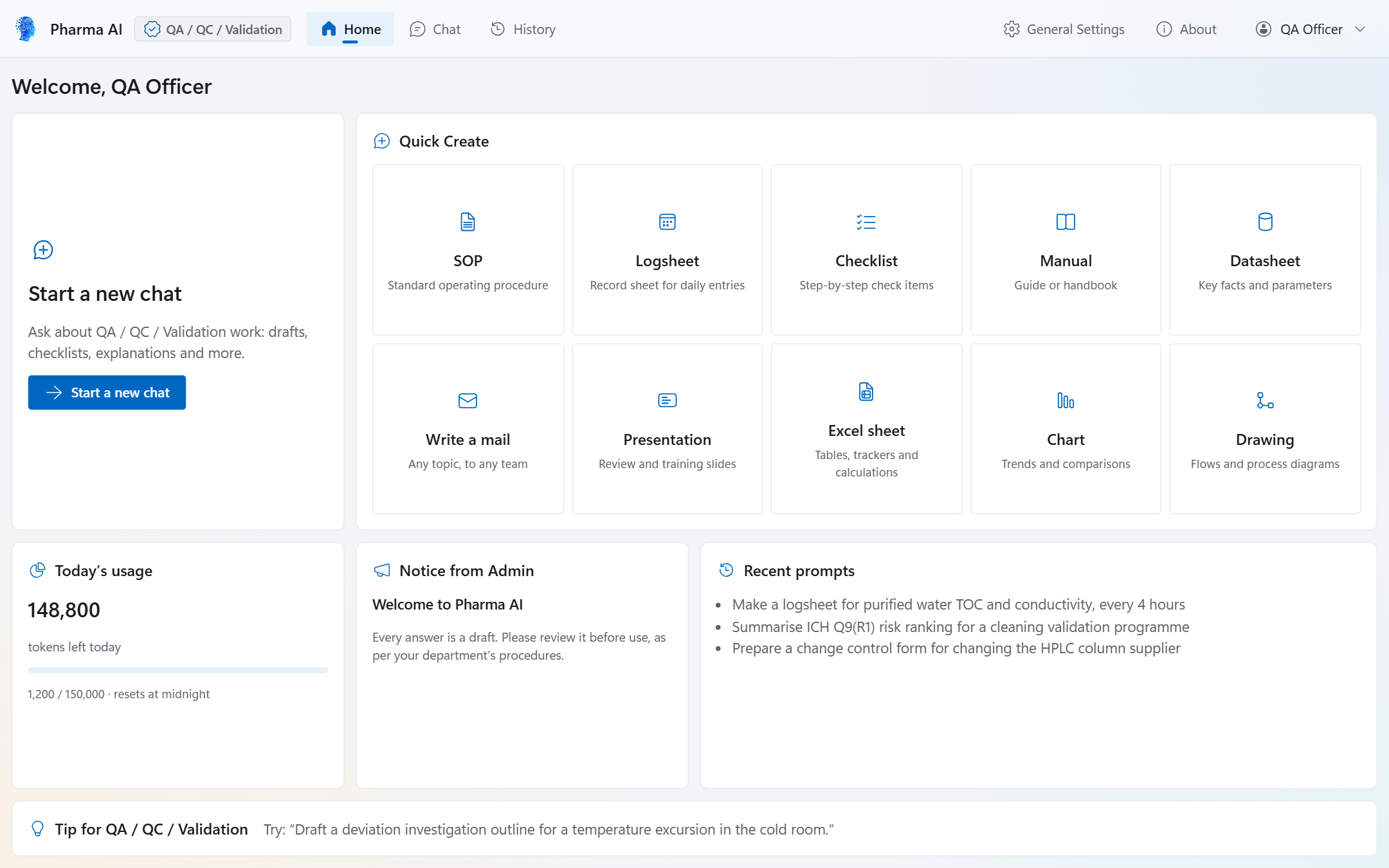
Pharma AI Home screen for a QA / QC / Validation user with Quick Create cards for SOP, Logsheet, Checklist, Manual, Datasheet, Write a mail, Presentation, Excel sheet, Chart and Drawing
Faster Documentation

Documentation work across the company becomes faster and more consistent.

SOPs, logsheets, checklists, manuals, datasheets, presentations, Excel sheets, charts, drawings and e-mails are drafted in minutes in your company's own format, ready for review. Word, PDF and PowerPoint files carry your company logo and name, the department, the user and the date. Your teams spend their time reviewing and approving instead of typing from scratch.

01

Choose a Quick Create card

SOP, Logsheet, Checklist, Manual, Datasheet, Write a mail, Presentation, Excel sheet, Chart or Drawing.

02

Answer a short guided form

Give the topic and the key details. The department's AI then drafts the file in the chat.

03

Get the draft in your format

A Word, PDF, Excel, PowerPoint, chart, drawing or e-mail (.eml) draft opens in the sandboxed preview, ready to download.

04

Review and approve

Your people review and approve the draft in your own quality system. Every file is marked “AI-assisted draft – review before use”.

Whole Company · Regulated Environments

Built for the whole pharma company. Ready for regulated work.

Corporate office, manufacturing plant and common services: all 19 standard departments work in one controlled system. Its functions are built on 21 CFR Part 11 and EU GMP Annex 11 requirements, and your company validates Pharma AI for its intended use with our complete supplier validation pack.

Functions built on 21 CFR Part 11 & EU GMP Annex 11 requirements

Part 11-ready controls: append-only audit trail, role-based access, password re-authentication

Designed to support ALCOA+ data integrity and GAMP 5 guidance

Human in the loop: the AI never approves, signs or releases records

The FDA and EMA do not certify software for Part 11 or Annex 11: your company validates Pharma AI with our complete supplier validation pack

Your records stay on your own company server: N Automations has no account on it and cannot read it

See It in Action

A focused AI assistant for each department.

Users get drafts to review. They never get decisions. Select a screenshot to open it full size.
Pharma AI Home screen with Start a new chat and the Quick Create cards
01 · Department HomeEach department gets its own AI. Start a chat or use a Quick Create card for SOPs, logsheets, checklists and more.
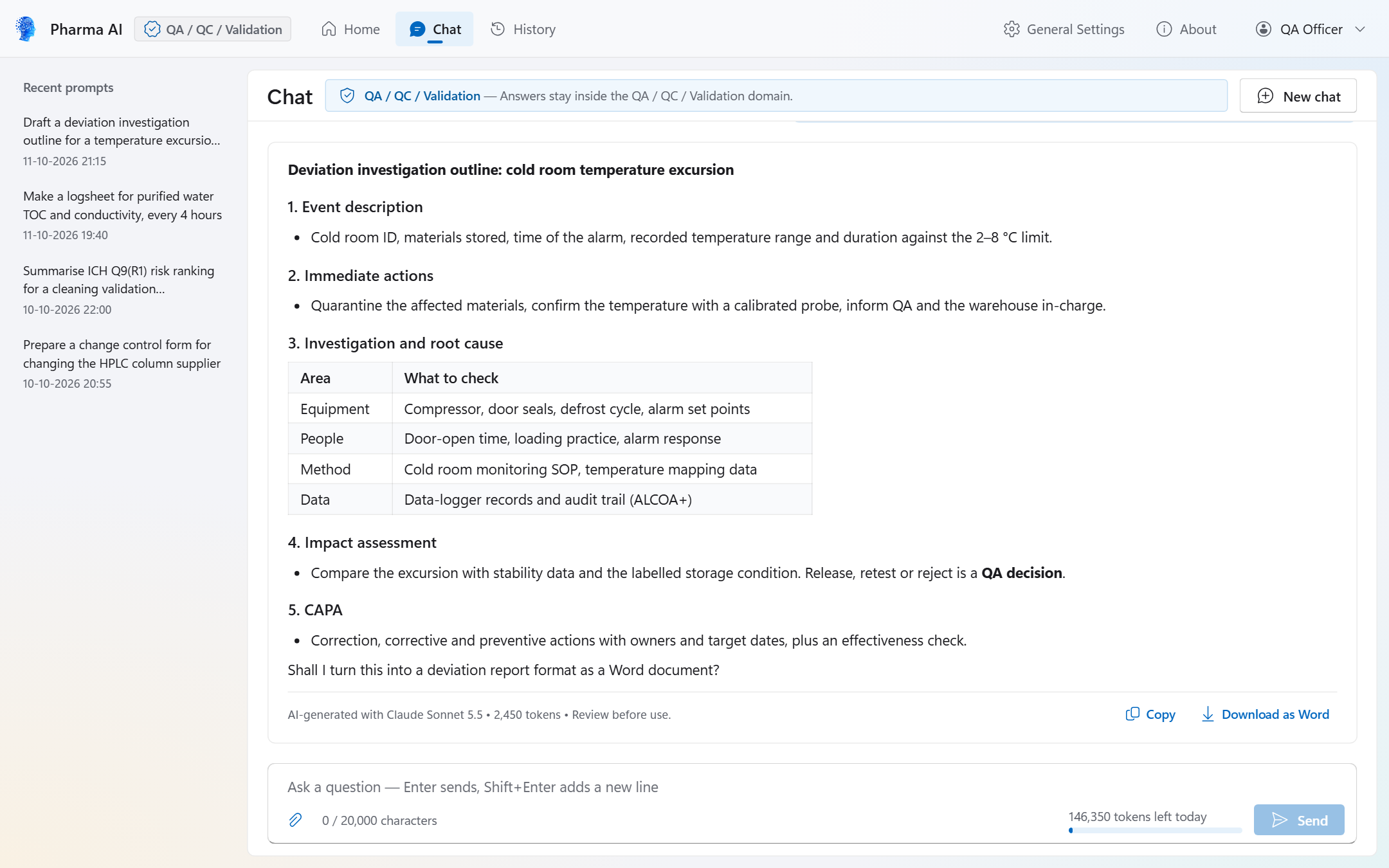
A deviation investigation outline answered in the QA / QC / Validation chat, marked AI-generated with Review before use
02 · Chat AnswerStreaming answers in the QA / QC / Validation department, each marked as AI-generated with a review-before-use note.
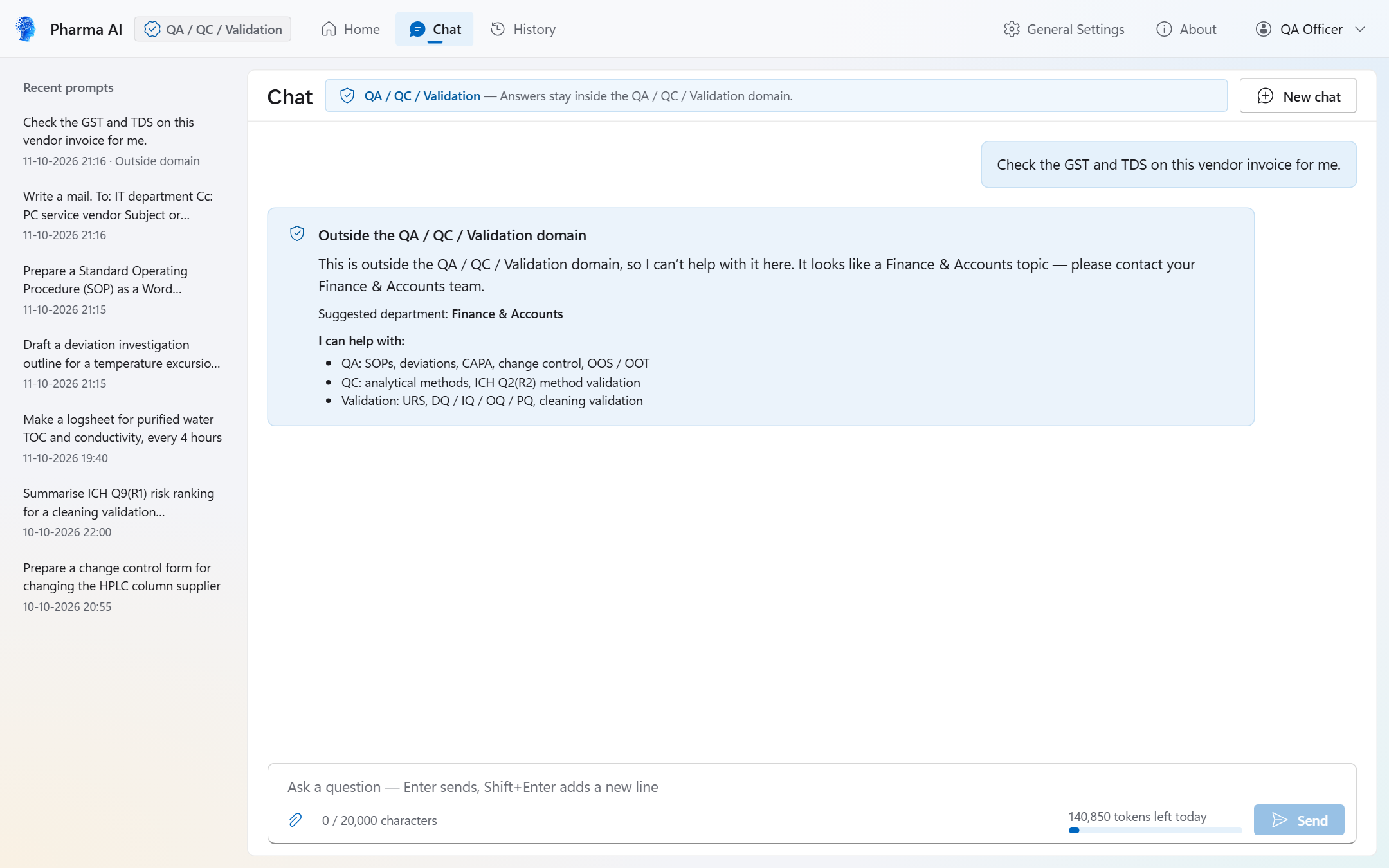
Domain Guard refusing a finance question in the QA / QC / Validation chat and suggesting the Finance & Accounts department
03 · Domain GuardDomain Guard politely refuses questions from outside the department and names the right department.
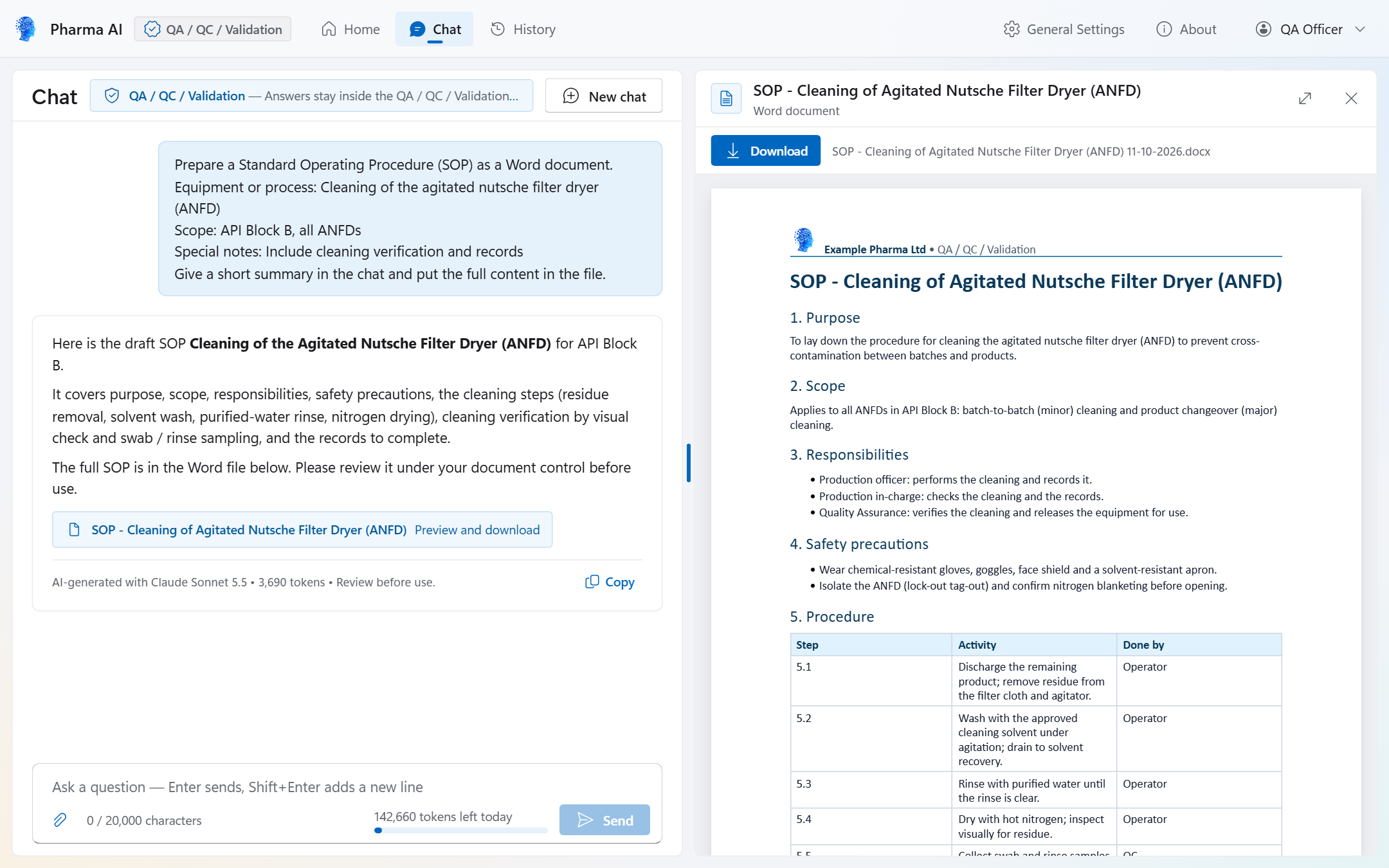
A created SOP Word file in the sandboxed preview panel next to the chat, with the company header and a Download button
04 · Word PreviewCreated Word files open in a sandboxed preview with your company header. Download is the only action.
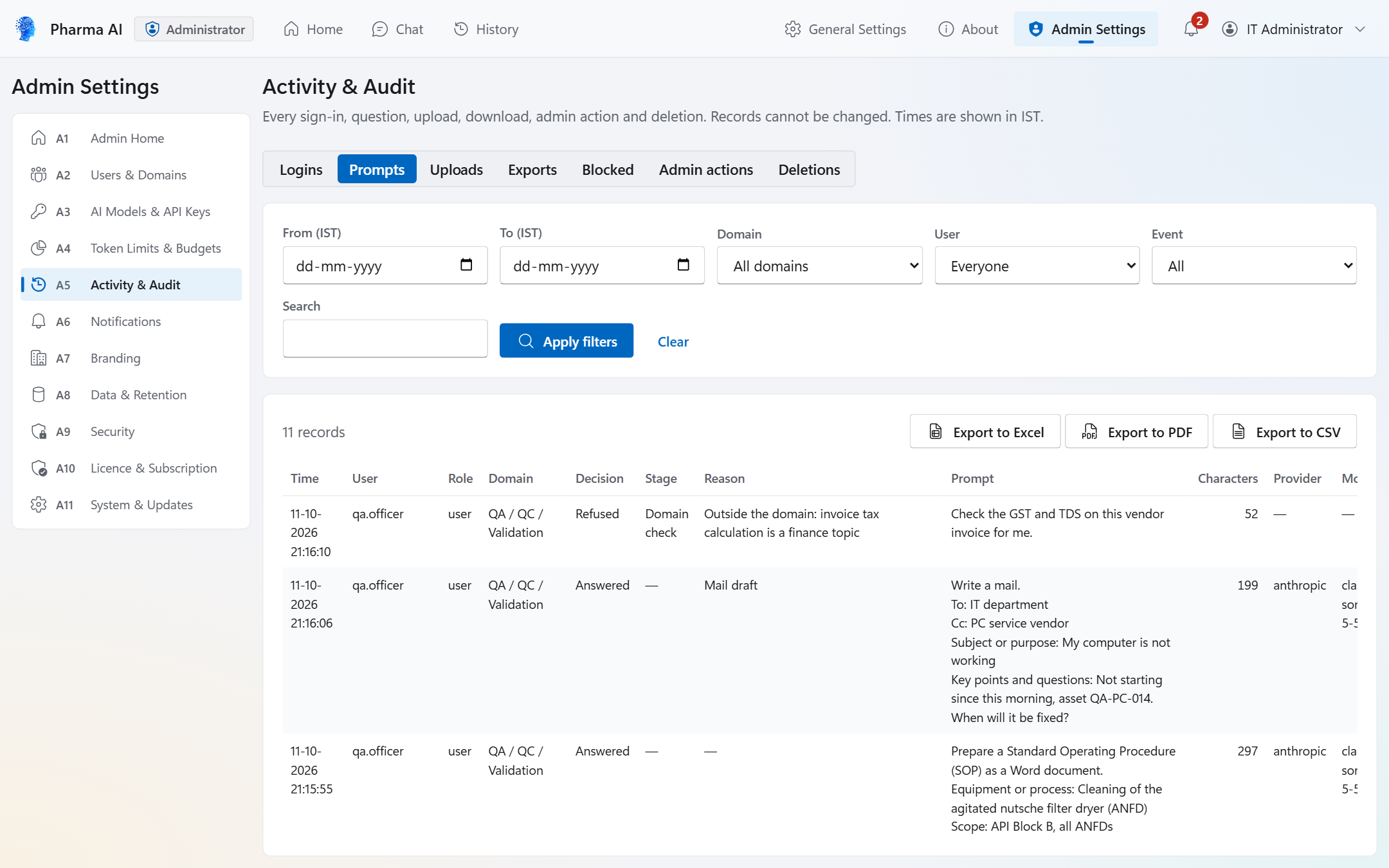
Activity & Audit, Prompts tab, listing each question with user, domain, Domain Guard decision and reason, with export to Excel, PDF or CSV
05 · Activity & AuditActivity & Audit shows every question with its Domain Guard decision, with export to Excel, PDF or CSV.
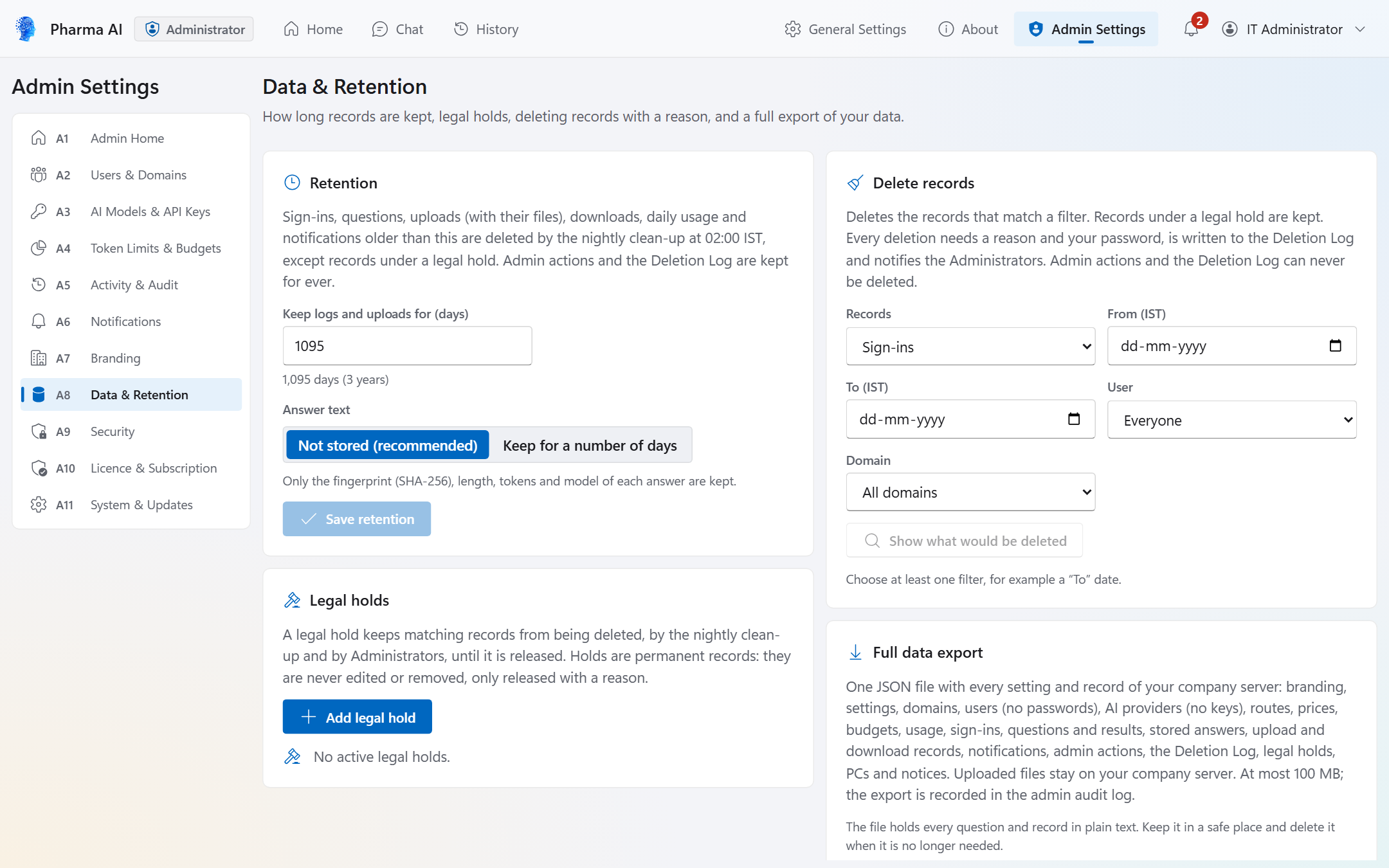
Data & Retention settings: retention in days, answer text not stored, legal holds, deleting records with a reason and the full data export
06 · Data & RetentionRetention periods, legal holds, controlled deletion with a reason, and a full data export.
Free Download · Version 1.1.0

Download Pharma AI for Windows and macOS.

The download is free. The setup wizard starts a 3-month free trial with complete access, unlimited users and PCs, and no licence key. The macOS version is one universal app for Apple Silicon and Intel Macs.

Recommended

Microsoft Store

Get it from Microsoft Store

Free, signed by Microsoft, no Windows warning, updated by the Store. IT: winget install --id 9NVN67CVWFN0 --source msstore or Intune.

Website Installer

Direct download

Direct download (.exe)
  • File PharmaAI_Setup_1.1.0_x64.exe
  • Version 1.1.0
  • Size 9.64 MB (10,109,608 bytes)
  • Windows Windows 11, or Windows 10 version 22H2, 64-bit (x64)
SHA-256EACB408792FA6D7F1A7612F3EAAAF0B9084BDCFEC171245A1FB99C862A31B4C2

Signed by N Automations. Updates after your Administrator approves them.

Apple Mac

macOS

Download for macOS (.dmg)
  • File PharmaAI_1.1.0_universal.dmg
  • Version 1.1.0
  • Size 22.66 MB (23,759,196 bytes)
  • macOS macOS 11 Big Sur or later, Apple Silicon and Intel (universal)
SHA-25627f2823187c80bd74074557055f7677a279c3096b440485cc8129bf408d29c4a

Ad-hoc signed, no Apple certificate. Updates: the new .dmg from this page.

How to install
Windows (.exe) Run the installer, then on SmartScreen click More info › Run anyway.
Read more

The installer is signed with N Automations' own certificate, so SmartScreen asks once. Check the file first: Get-FileHash -Algorithm SHA256 PharmaAI_Setup_1.1.0_x64.exe must show the SHA-256 above. If Smart App Control blocks it, use the Microsoft Store version.

macOS (.dmg) Drag the app to Applications, then in Privacy & Security click Open Anyway.
Read more

The app has an ad-hoc signature and is not notarised by Apple, so macOS asks once (and after each update). Check the file first: shasum -a 256 PharmaAI_1.1.0_universal.dmg must show the SHA-256 above. At every start the app checks its own files.

Need help? support@nautomations.in

Validation & Documentation · Version 1.1.0

Every document your QA and validation team will ask for.

Pharma AI comes with a complete documentation pack for version 1.1.0 (Windows and macOS), so your company can qualify and validate it faster: requirements, specifications, DQ / IQ / OQ / PQ protocol templates, test evidence and the 21 CFR Part 11 / EU GMP Annex 11 assessment. The documents are shared with companies directly. Click any document to contact us for a copy.

The documents support your company's own validation. There is no certificate: the FDA and the EMA do not certify software. Your company achieves compliance by validating Pharma AI for its intended use. Contact us for the documentation pack.

What Pharma AI Does

Everyday questions and drafting, department by department.

Pharma AI gives each department a focused AI assistant for everyday questions and drafting. Users get drafts to review. They never get decisions.

21 CFR Part 11 · EU GMP Annex 11

Functions built on 21 CFR Part 11 and EU GMP Annex 11 requirements.

Pharma AI's functions are built on the electronic-record requirements of 21 CFR Part 11 and EU GMP Annex 11, and support ALCOA+ data-integrity principles and GAMP 5 guidance. In our clause-by-clause assessment, the controls for system access, authority checks, device checks, audit trails and record copies are assessed as supported, and step sequencing as supported where applicable. Protecting records over the whole retention period, archiving and data migration are partly supported, as explained under “About certification” below. Pharma AI has no electronic signatures, so Part 11 Subpart C does not apply, and the AI never approves, signs or releases records. Built-in controls and supplier evidence:

About Certification

Asked for a Part 11 certificate? Here is the answer.

Does Pharma AI have a 21 CFR Part 11 certificate? +

No. The FDA and the EMA do not certify or approve software for 21 CFR Part 11 or EU GMP Annex 11 compliance, so no software can hold an official “Part 11 certificate” or “Annex 11 certificate”. A pharmaceutical company achieves compliance by validating the system for its intended use and running it under its own SOPs and controls. N Automations supplies the complete supplier validation pack to make that fast: a User Requirement Specification with 121 requirements, a requirements traceability matrix, a software verification and validation report, and a clause-by-clause 21 CFR Part 11 / EU GMP Annex 11 Regulatory Compliance Assessment. Write to info@nautomations.in to receive it.

How far does Pharma AI meet Part 11 and Annex 11? +

Its functions are built on both. In our clause-by-clause Regulatory Compliance Assessment, the Part 11 controls for limited system access (11.10 d), audit trails (11.10 e), authority checks (11.10 g), device checks (11.10 h) and record copies (11.10 b, with one stated limitation: AI answer text is kept only if your Administrator switches answer storage on) are assessed as supported, and step sequencing (11.10 f) as supported where applicable. For Annex 11, data-exchange checks (5), printed copies through exports (8.1), the audit trail (9), logical access and security controls (12.1 to 12.4) and business continuity (16) are assessed as supported. Three areas are partly supported: protecting records for the whole retention period (11.10 c; Annex 11 clause 7.1) and archiving (Annex 11 clause 17), which also depend on your company's hosting, backups and archives; and data migration (Annex 11 clause 4.8), because a restore tool for the full data export is not part of version 1.1.0. Pharma AI has no electronic signatures, so Part 11 Subpart C does not apply. Validation, training, written policies, document control, backups and the classification of your deployment remain your company's responsibility under its own quality system; the assessment gives practical guidance for each. The assessment covers Pharma AI 1.1.0 for Windows. The macOS version has the same functions and uses the same company server, but it was not assessed separately.

How It Works

Your server, your AI key.

Pharma AI keeps your company's data under your company's control. In daily use, PCs talk only to your company server, and your company server talks to the AI provider you choose.

01

Your PCs

Pharma AI on Windows and macOS. PCs and Macs connect only to your company server, over HTTPS and WSS.

02

Your company server

Supabase, set up automatically, or self-hosted. Accounts, records, files, settings and AI keys are stored only here.

03

Your AI provider

OpenAI, Azure OpenAI, Anthropic (Claude) or Google Gemini, called only from your server with your own key.

04

Licence data only

N Automations has no account on your server and cannot read it. It receives only licence data.

Administration

Administration, branding and accessibility.

  • Eleven Administrator areas: Admin Home, Users & Domains, AI Models & API Keys, Token Limits & Budgets, Activity & Audit, Notifications, Branding, Data & Retention, Security, Licence & Subscription, and System & Updates.
  • Notifications for uploads and Level-2 password use (always on) and, switchable, for lockouts, Level-2 password locks, budget alerts, deletions, licence warnings and recovery-code use.
  • Branding: your company logo and app name appear in the header and window title on every PC and Mac, and in the taskbar and shortcuts on Windows.
  • Administrator recovery: a Backup Admin, ten one-time recovery codes and a logged break-glass procedure with two named people. N Automations holds no credentials and has no back door.
  • Accessibility: text size from 50 to 200 %, high-contrast mode, full keyboard use, visible focus, text contrast of at least 4.5:1, screen-reader labels, reduced motion, and light and dark themes that follow Windows or macOS.
Security & Privacy

Security and privacy.

  • No share, send, e-mail or print controls; no connectors, plug-ins, web browsing or code execution; and no telemetry, analytics or crash reports.
  • PCs connect only to your company server, over HTTPS and WSS. During setup or a company-server update, the Administrator's PC also reaches the N Automations Licence Service and api.supabase.com. Windows PCs installed from the website also fetch the signed update file from www.nautomations.in when an update is checked or approved; Macs fetch no update file.
  • Integrity: SHA-256 fingerprints of answers, uploads and downloaded files; licence data signed with Ed25519; requests checked against strict schemas; and TLS for all traffic.
  • Hardened 1.1.0 build: a compiled core without debug information, encrypted sensitive texts, obfuscated setup, sign-in and licence screens, an integrity check at every start (on a Mac, of the bundled server files and guides) and debugger detection. No software can be guaranteed impossible to attack; our Application Security Hardening Statement explains the protections and their limits.
  • N Automations receives only licence data: the Administrator's company e-mail address and its domain, your company server address, the app version, and daily counts of active, disabled and total user accounts. It never sees user names, usernames, passwords, questions, answers, files, audit logs or AI keys. See the Pharma AI privacy policy for details.
Free Trial & Licensing

Start free for 3 months.

  • The download is free, from the Microsoft Store or this page.
  • 3-month free trial: 90 days from the moment the setup wizard activates it, with complete access, unlimited users and PCs, and no licence key. There is one trial per company e-mail domain and per company server.
  • The Administrator sees reminders when 30, 14 and 7 days are left. If no licence is bought, new AI questions pause on day 91. Sign-in, History, the audit trail and exports keep working, and nothing is deleted.
  • 1-year licence: 365 days from the switch-on day or the end of the trial, whichever is later, so unused trial days are kept. 15 grace days follow the end date.
  • Lifetime licence: never expires and includes all future updates. N Automations can pause and resume it, for example if a payment bounces.
  • Licences are counted per active user account: any User, Admin or Backup Admin account that exists and is not disabled on an India-time day. The bill uses the highest daily count in the billing period. PCs are not counted, and there is no hard user limit; extra users are billed at renewal or by invoice.
  • After payment, N Automations switches your licence on. There is no key to type and no reinstall. No prices are published; for a quotation, write to info@nautomations.in.
  • Business continuity: the app keeps working for up to 30 days if your company server cannot reach the Licence Service, and Administrators see a warning after 7 days. After a licence ends, a renew-only mode keeps History, the audit trail and exports available.
  • Your company pays its AI provider and its company server platform directly.
System Requirements

What you will need.

  • Windows version: Windows 11, or Windows 10 version 22H2, 64-bit (x64); ARM PCs are not supported. The Microsoft Store version runs on Windows 10 version 2004 (build 19041) or later.
  • macOS version: macOS 11 Big Sur or later, on Apple Silicon or Intel Macs (one universal app), with the latest Safari update for that macOS version (Safari 16.4 or later); a screen of at least 1280 × 720 and about 100 MB of disk. Copying the app into Applications needs an administrator password; using it does not.
  • Microsoft Edge WebView2 runtime (built into Windows 11 and normally present on updated Windows 10; the website installer downloads it from Microsoft if it is missing)
  • A screen of at least 1366 × 768, with display scaling of 100, 125, 150 or 200 %
  • About 10 MB for the program, plus space for downloaded files. No special hardware is needed.
  • The PC clock must be correct to within 10 minutes. No administrator rights are needed to install (per user) or use the app.
  • Network: outbound HTTPS (port 443) and WSS from PCs to your company server; during setup, the Administrator's PC also needs the N Automations Licence Service and api.supabase.com
  • Company server: Supabase, or the free self-hosted edition of Supabase on your own server or cloud, reachable over https with a valid certificate. The server needs internet access, so air-gapped sites are not supported in 1.1.0.
  • An API account with OpenAI, Azure OpenAI, Anthropic (Claude) or Google Gemini, paid for by your company
  • A company e-mail address on your own domain for setup. Gmail, Yahoo, Outlook.com, Rediffmail and other free e-mail services are refused.
  • Virtual desktops and Remote Desktop session hosts are not validated for 1.1.0.
For IT Teams

Roll-out for IT teams.

  • Microsoft Store (recommended): signed by Microsoft, no Windows warning, updated by the Store, and installed per user without administrator rights.
  • winget: winget install --id 9NVN67CVWFN0 --source msstore
  • Microsoft Intune: add Pharma AI as a Microsoft Store app (Store ID 9NVN67CVWFN0) and assign it to your device or user groups.
  • Each PC joins once with a single PC connection code. For a mass roll-out, IT can place the code in %ProgramData%\PharmaAI\connection-code.txt. The file must be writable only by administrators; otherwise the app ignores it. On Macs the file is /Library/Application Support/PharmaAI/connection-code.txt, owned by root and not writable by anyone else.
  • macOS: the universal .dmg from this page, with an ad-hoc signature (no Apple certificate) and not notarised by Apple (check its SHA-256, then confirm the first start in System Settings > Privacy & Security > Open Anyway). Macs never update themselves; IT installs the new .dmg.
  • Website installer: signed with N Automations' own certificate. Updates install only after your Administrator approves the new version. On Windows 11 PCs with Smart App Control switched on, use the Microsoft Store version.

Store, winget and Intune installs use the Microsoft Store listing (Store ID 9NVN67CVWFN0).

Support

Talk to N Automations.

N Automations, Hyderabad, India. Supplier evidence for your validation is part of our documentation pack; write to info@nautomations.in to receive it.

Sales & licencesinfo@nautomations.in
Phone / WhatsApp+91 96669 36366

Start Your Free 3-Month Trial.

Complete access for unlimited users and PCs, with no licence key. Your records stay on your own company server.

Pharma AI is designed to support 21 CFR Part 11, EU GMP Annex 11, ALCOA+ data-integrity principles and GAMP 5 guidance. N Automations' Regulatory Compliance Assessment is an assessment, not a certificate. Pharma AI is not certified or approved by the FDA, the EMA or any other regulator or third party. Your company achieves compliance by validating Pharma AI for its intended use, supported by our documentation pack. Pharma AI is a drafting and question-answering assistant with no electronic signatures. Every output is an AI-generated draft that must be reviewed before use. The software does not make GMP decisions, and it does not approve, sign, release or certify records. Microsoft, Windows, Azure and Intune are trademarks of the Microsoft group of companies. Apple, Mac and macOS are trademarks of Apple Inc. Other product names are the property of their owners.